Showing posts with label Snapchat. Show all posts

Sunday, 16 April 2017

How to delete Snapchat Account ?

Last time on a topic related to Snapchat had discussed about creating Snapchat account, in this topic will cover about the way account can be deleted. As mentioned last time that Snapchat is quite a tricky app and those who tried it in India must knows about it. Snapchat is nothing to offer via Website though its something similar to Instagram, with Insta users can check the timeline of their "Following" but not the case with Snapchat, yes like Insta where user can deactivate the account temporary Snapchat too provide the option of deleting the account via Website only.


Image Credit: Snapchat


How to Delete Snapchat Account ?


* First of all user needs to browser the official website of Snapchat, make sure to add https if typing manually.


* Scroll down you will get Support option through a tray design in a Website, you needs to click on it or you can directly reach into it by typing Support URL, again make sure to add https.


* After the Support Page you will see 3 Lines at right hand top, click into it.


* Then click on "My Account & Settings"


* At Account Information, you will get "Delete My Account" option (you might encounter few more options under Account Information as per updates in the Website).


* Now next page will contain a emotional message of Snapchat, their entire post can be updated as per company's policy and link's position.


* In next page you needs to provide your Username and Password and needs to click continue.


* Once done they will confirm you regarding your Account Deactivation, you will get 30 days to restore your account otherwise after 30 days its not possible to reactivate it again. You will get a confirmation email as well if your account is linked with Verified Email ID.


One of the reason to deactivate your account may be a Username (as Snap.inc themselves suggesting), since Snapchat as of now not allowing Users to change Username later (due to security concern as per Snap.inc) hence in that case Users can deactivate their account consists of weird username or anything which they don't wants to use anymore

If wants to Signup for Snapchat again then click here

Disclaimer: This post is not intent to discourage Snapchat users and should be read as informative purpose only, post motive is not to offend but only for awareness. Writer and Website will not hold any responsibility regarding users business with Snapchat.

Author of this post is +Anirudha Das, he writes in Tech, Sports, Social, Politics, Business. Follow him on social media at @anirudhasdas

Thursday, 23 March 2017

How to signup for Snapchat ?

The craze of Snapchat is rapidly increasing and tats why companies are also launching the similar kind of feature to encounters it. Basically Snapchat allow users to post their story infront of their friends or followers and interestingly that story will stay for next 24 hours only which means users always have a room to share a new and their followers will remain thrill for next story. The entire concept is welcomed by the industry which gave Snapchat a wings and got motivated to hit their IPO and according to Media Reports they also planning to launch their Smartphone division.


Image Credit: Snapchat

None the less, since popular social media apps followed the suit of Snapchat, last year Hike in India launched their version of "Stories" and even Instagram joined the space, WhatsApp too bought the similar kind of feature last month which definitely gonna make people curious about Snapchat. Snapchat as of now not much targeting in India and since they're not targeting means that Snapchat app will not able to work flawlessly in Mid range or Low range smartphones. App is quite heavy as of now and because of that its not able to adopt the hardware of the phone. Running memory of the phone mostly consumes either from Camera or from Background Apps and since Snapchat App is itself is quite heavy plus its usage with Camera will led your phone hanging but if you have high end premium phones then Snapchat can be your next destination.

Hence lets find out How to signup for Snapchat ?  

* First you needs to download Snapchat App from Google Playstore or from iTunes

* After installing, when you open the App you will see the interface with 2 options: Log In or Sign Up, you needs to select Sign Up if wants to create a new account otherwise Log In with existing account. 


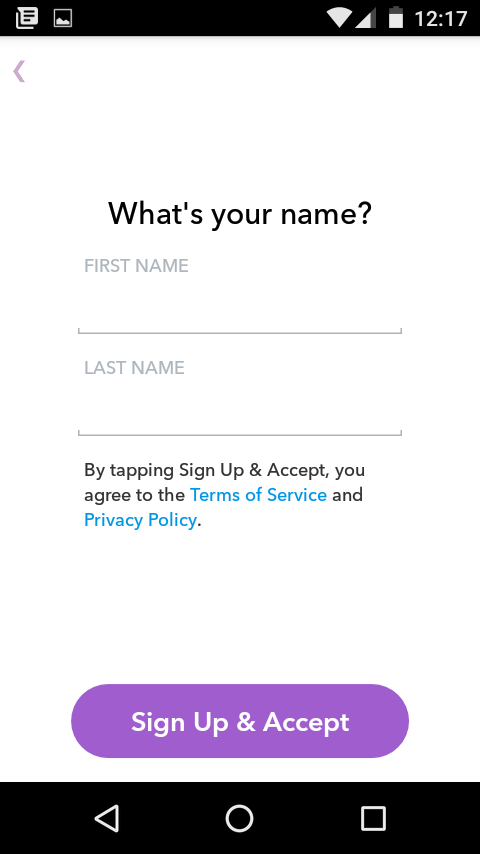
* In next page you needs to set your Name which can be anything which can be change later as well, after providing you needs to go ahead by clicking to "Sign Up & Accept".


* Now you have to add your Birthday.


* Now its time to set username from which not only you can login with your account but others can find you or can add you in Snapchat. But remember one thing that once set you can't change username later and you have to delete your Snapchat account and have to create a new one, so if you're maintaining social media with some unique username everywhere then better use the same here as well.


* Now password for the account.


* Now you have to verify account with either Mobile Number or Email ID, you can change these later as well and can verify Number or Email anytime.


* Once done you will be ask to verify yourself either you're a Human or Robot, nothing to worry you just needs to catch a Ghost which is kind a fun game from Snapchat ;)

* After verifying you will be ask to add existing Snapchat users either via Contact List or via Emails, you can add Celebrity Account as well with their Usernames, after completing all you're ready to share your first story with your community.


Since its a quite unique Social Media App, tats why its having different way of working too. To add existing users it gives you two ways, either manually by tapping on "Add Friends" or add via "Snapcode" its like Barcode scanner, where you needs to center your Camera on your Friends Snapcode and to find it that, your Friends needs to click on the Ghost icon at the top of their Snapchat Screen, once you got it Touch and Hold the image of your Friends Snapcode to add them and Happy Snapping..


Author of this post is +Anirudha Das, he writes in Tech, Sports, Social, Politics, Business. Follow him on social media at @anirudhasdas

Wednesday, 22 March 2017

How to add Multiple Pictures in Instagram ?

Imagine a social media app which only made for sharing photos but also allow users to add only single photo at once !! Instagram after Facebook buyout has grown rapidly but due to its limitation it remains more like a celebrity app for a long time where users can like and comments and share one image at a time. Even in current scenario multiple-pictures looks same like regular ones in Instagram Feed, only rows of rectangles underneath the photo distinguish the post having multiple photos.


You can swipe between right and left to see new photos of the post but its having a limit of 10 photos. This particular move will save from multiple posts at a same time and can now have a combination of best and good photos in the set. Likes and comments will be apply in a entire post and not in individual photos just like Facebook has Albums in case of multiple photos, though you can like and comment individually in Facebook.

Post Multiple Photos in Instagram


* Update Instagram with latest version in both Android and iOS store respectively.

* Just like regular post in Instagram App, you have to click on Plus sign in the bottom of the App. You will be moved to next page where you will be ask to select photos, you will get a option to add "Multiple image" button along with regular Boomerang and Layout shortcuts.

* While selecting photos or videos or capturing it live from Instagram App you will see numbering icon which will indicate you that at which position photos or videos will stand according to you, after doing this step you can click next at the top right hand side.

* In next page you will be encounter with filters which can let you do some editing part with the photos, you can edit set of photos individually as well or can arrange photos by holding and dragging, if wants to add more photos then you will have plus icon at right side and if wants to delete photos then you needs to hold the photo and drag it to bin icon at the top to delete, once you done with this exercise click on next.

* Then you will reach to "Share To" where you can write something about photos or little bit about the Moment, as usual you have two options to share either to your Followers in Public or otherwise as Direct Message to your Followers. You can also add Location of the photos and Tag peoples, can share it on your Twitter account, Tumblr, Swarn, Flickr. Sharing part in Facebook "Page" is still not enabled by Facebook end despite Instagram bought by Facebook a long back now, still its only be available for Facebook Profiles, in Advance Settings you can disable comments.

Its a good move in the favor of Instagram after Facebook launched stories to compete with Snapchat, this feature also allows user to post multiple photos without pushing it into users main feed which gets disappear after 24 hours.


Author of this post is +Anirudha Das, he writes in Tech, Sports, Social, Politics, Business. Follow him on social media at @anirudhasdas